SVG rendering
The chess.svg module renders SVG Tiny images (mostly for IPython/Jupyter
Notebook integration). The piece images by
Colin M.L. Burnett are triple
licensed under the GFDL, BSD and GPL.
-
chess.svg.piece(piece: chess.Piece, size: Optional[int] = None) → str[source]¶ Renders the given
chess.Pieceas an SVG image.>>> import chess >>> import chess.svg >>> >>> chess.svg.piece(chess.Piece.from_symbol("R"))


-
chess.svg.board(board: Optional[chess.BaseBoard] = None, *, orientation: chess.Color = True, lastmove: Optional[chess.Move] = None, check: Optional[chess.Square] = None, arrows: Iterable[Union[chess.svg.Arrow, Tuple[chess.Square, chess.Square]]] = [], squares: Optional[chess.IntoSquareSet] = None, size: Optional[int] = None, coordinates: bool = True, colors: Dict[str, str] = {}, flipped: bool = False, style: Optional[str] = None) → str[source]¶ Renders a board with pieces and/or selected squares as an SVG image.
- Parameters
board – A
chess.BaseBoardfor a chessboard with pieces, orNone(the default) for a chessboard without pieces.orientation – The point of view, defaulting to
chess.WHITE.lastmove – A
chess.Moveto be highlighted.check – A square to be marked indicating a check.
arrows – A list of
Arrowobjects, like[chess.svg.Arrow(chess.E2, chess.E4)], or a list of tuples, like[(chess.E2, chess.E4)]. An arrow from a square pointing to the same square is drawn as a circle, like[(chess.E2, chess.E2)].squares – A
chess.SquareSetwith selected squares.size – The size of the image in pixels (e.g.,
400for a 400 by 400 board), orNone(the default) for no size limit.coordinates – Pass
Falseto disable the coordinate margin.colors – A dictionary to override default colors. Possible keys are
square light,square dark,square light lastmove,square dark lastmove,margin,coord,arrow green,arrow blue,arrow red, andarrow yellow. Values should look like#ffce9e(opaque), or#15781B80(transparent).flipped – Pass
Trueto flip the board.style – A CSS stylesheet to include in the SVG image.
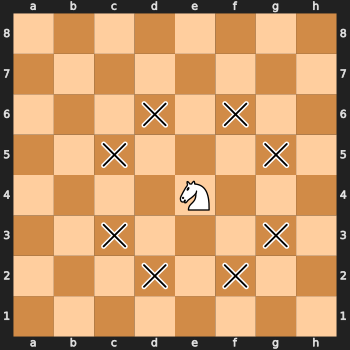
>>> import chess
>>> import chess.svg
>>>
>>> board = chess.Board("8/8/8/8/4N3/8/8/8 w - - 0 1")
>>> squares = board.attacks(chess.E4)
>>> chess.svg.board(board, squares=squares, size=350)
Deprecated since version 1.1: Use orientation with a color instead of the flipped toggle.


-
class
chess.svg.Arrow(tail: chess.Square, head: chess.Square, *, color: str = 'green')[source]¶ Details of an arrow to be drawn.
-
tail: chess.Square¶ Start square of the arrow.
-
head: chess.Square¶ End square of the arrow.
-
color: str¶ Arrow color.
-
pgn() → str[source]¶ Returns the arrow in the format used by
[%csl ...]and[%cal ...]PGN annotations, e.g.,Ga1orYa2h2.Colors other than
red,yellow, andbluedefault to green.
-
classmethod
from_pgn(pgn: str) → chess.svg.Arrow[source]¶ Parses an arrow from the format used by
[%csl ...]and[%cal ...]PGN annotations, e.g.,Ga1orYa2h2.Also allows skipping the color prefix, defaulting to green.
- Raises
ValueErrorif the format is invalid.
-


